

Your laptop sitting flat on the desk is not a neutral position. You tilt your head down 15 to 45 degrees to see the screen, which puts somewhere between 27 and 60 pounds of effective load on your cervical spine, depending on the angle. Do that for six or eight hours a day and you end up with the classic work-from-home complaints: tight traps, stiff neck, headaches by mid-afternoon, and a general sense that your chair is the problem when it probably is not. The real problem is your screen height. A laptop stand raises the screen to eye level in about 90 seconds, costs less than a dinner out, and makes a measurable difference from day one. I have been using the BESIGN LS03 aluminum stand daily for months and the reasons to recommend it keep stacking up.
Below are 10 specific reasons a laptop stand improves your posture and your overall workday. Every one of them applies to the BESIGN LS03 specifically, but most are true of any decent stand that puts your screen at the right height.
Stop craning your neck at a flat screen. The fix is inexpensive.
The BESIGN LS03 is an aluminum laptop stand rated 4.8 stars across 23,756 reviews. It sets up in seconds, holds laptops up to 17 inches, and folds flat for travel. One of the best posture upgrades you can make for your home office at any price.
Amazon Check Today's Price on Amazon →It Puts Your Screen at Eye Level Without Any Fuss
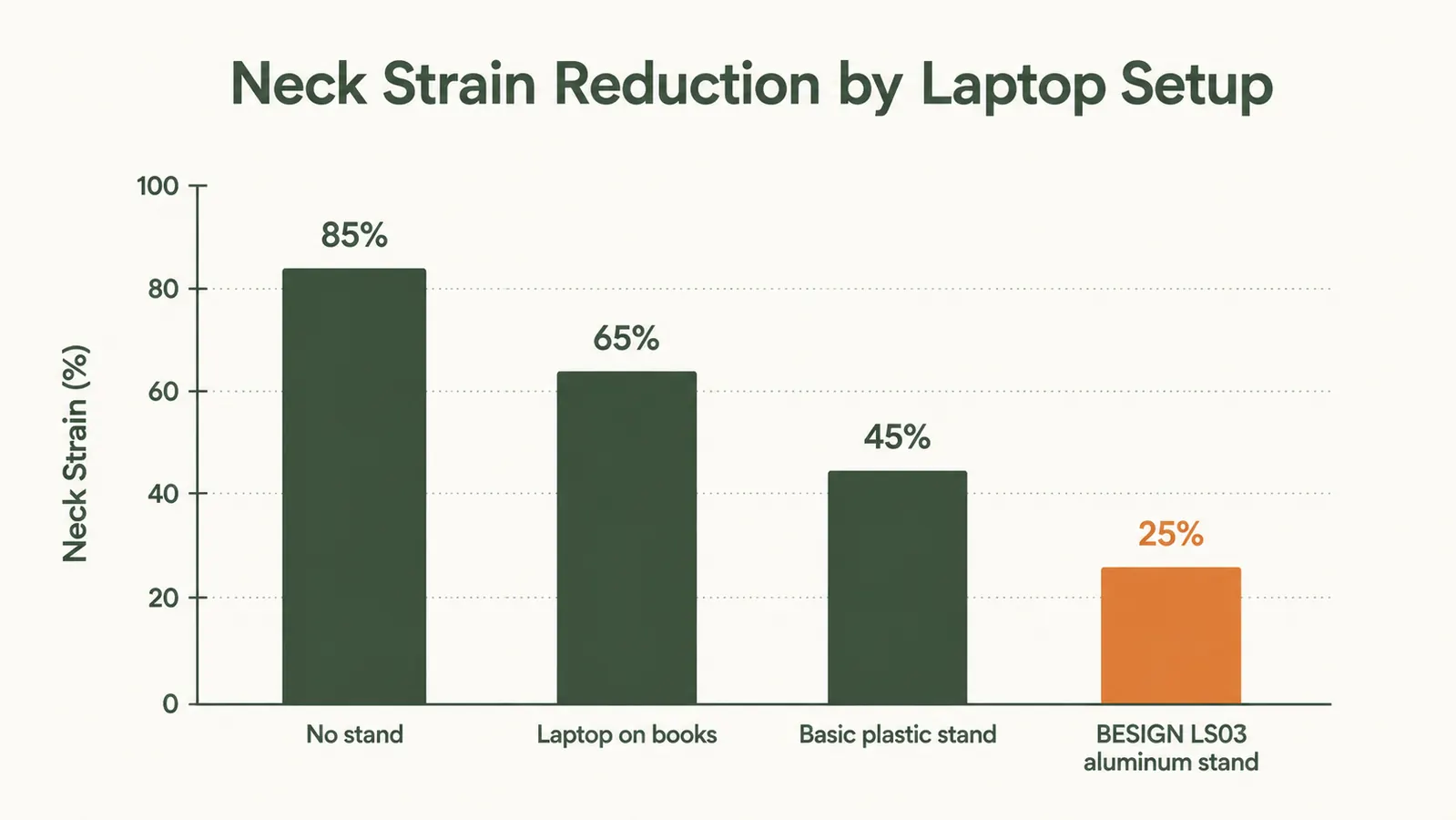
The single most important dimension in laptop ergonomics is screen height. When your eyes land naturally at the top third of the display, your head stays upright and your spine follows. The BESIGN LS03 raises most 13 to 15 inch laptops to roughly that position right out of the box. No adjusting, no stacking books underneath, no guesswork. You sit down, open the laptop, and your posture changes almost immediately.
It Forces You to Use an External Keyboard (Which Fixes Your Shoulders)
Once your laptop screen is at eye level, the built-in keyboard is too high to type on comfortably. That is actually a feature, not a bug. It pushes you toward an external keyboard placed lower on the desk at the right height for your arms. Your shoulders drop, your elbows land near 90 degrees, and the rounded-shoulder posture that comes from reaching up to type disappears. The BESIGN LS03 has an open-air design, so heat still vents while you type on a separate keyboard.
It Reduces Neck Strain in the First Hour of Work
Most people feel the difference faster than they expect. Within the first hour of using the stand, the constant low-level muscular effort your neck was doing to hold your head in that forward-tilted position stops. Some people describe it as tension releasing across the top of the shoulders. It is not magic, it is just your neck muscles no longer fighting gravity at a bad angle for six hours straight.

The Aluminum Build Keeps Your Laptop Cooler
Cheaper plastic stands trap heat under the laptop chassis. The BESIGN LS03 is all aluminum with large open gaps that let air circulate underneath. Your laptop runs cooler, the fan runs quieter, and sustained performance holds up better during long work sessions. For people who do video calls or run CPU-intensive tasks for hours, this matters more than most reviews admit.
It Fixes Forward Head Posture Passively, Without You Thinking About It
Forward head posture is when your ears drift in front of your shoulders. Sitting at a flat laptop is one of the main causes for desk workers. The problem with most posture fixes is that they require active effort and attention. A laptop stand fixes the root cause instead, your screen height, so your head naturally stays over your shoulders without you consciously reminding yourself to sit up straight. You just sit and work and the geometry handles it.
It Reduces Eye Strain by Cutting Downward Gaze Angle
When you look down at a flat laptop, your eyelids open wider than they would at a neutral gaze angle. This increases tear evaporation and contributes to dry eyes and eye fatigue over the course of a day. Raising the screen so your gaze angle is closer to horizontal reduces this. Your blink rate normalizes and the end-of-day gritty-eye feeling is less severe. Small thing, real difference.
It Clears Desk Space Under the Stand
The BESIGN LS03 has a compact footprint but lifts the laptop off the desk surface, freeing usable space underneath for a wireless dongle, a small notepad, or your phone charger. On a tight desk, this is meaningful square footage. The stand acts as a light organizer on top of its ergonomic function, which is a real bonus in smaller home offices.
It Is Stable Enough to Type on Directly When You Need To
Some stands wobble when you type on the built-in keyboard. The BESIGN LS03 does not. The rubber feet grip the desk and the design does not flex. That said, you should still use an external keyboard for long sessions. But for a quick reply when you are away from your main setup, you can type directly on the raised laptop without it shifting around.

It Travels Well Without Adding Meaningful Weight
The BESIGN LS03 weighs about a pound and folds down flat. If you work from coffee shops, co-working spaces, or clients' offices, you can toss it in a bag without thinking twice. Your posture does not have to suffer just because you are not at your main desk. It is one of those pieces of gear that you start taking with you everywhere once you notice what bad posture feels like without it.
It Is the Highest-ROI Posture Upgrade at Any Budget
The BESIGN LS03 costs a fraction of what you would pay for ergonomic furniture on Amazon, where it holds a 4.8-star rating across more than 23,000 reviews. Compare that to ergonomic chairs, monitor arms, or standing desks. None of those fixes screen height for someone on a laptop. The stand does, at a fraction of the cost. If you are going to do one thing for your posture today, this is it. For more on building a full ergonomic laptop setup, see our guide on <a href="/how-to-set-up-ergonomic-laptop-workstation">how to set up an ergonomic laptop workstation</a>, and for the complete product breakdown, check the <a href="/besign-laptop-stand-review">BESIGN LS03 review</a>.
What I'd Skip
Not every laptop stand is worth buying. Avoid the ultra-cheap plastic versions that flex when you press on them and tip forward under a heavier laptop. They tend to scratch the laptop chassis and the rubber pads peel off within a few weeks. Also skip the adjustable-height versions unless you genuinely need multiple height positions. Most people set a stand once and leave it, and the adjustable mechanisms add weight, bulk, and one more thing that can loosen over time. For a fixed-height aluminum stand that just works, the BESIGN LS03 is the better call.
Your laptop sitting flat on the desk is not a neutral position. It puts real load on your neck all day. Raising the screen by a few inches changes that geometry entirely, and you feel it within the first hour.
If your neck hurts at the end of every workday, this is where to start.
The BESIGN LS03 aluminum laptop stand is the most cost-effective posture fix for home office workers who use a laptop. Budget-priced, 4.8 stars, 23,000-plus reviews. Add an external keyboard and mouse and you have a proper ergonomic setup for a fraction of what a new chair or desk costs.
Amazon Check Today's Price on Amazon →